Data Vault & Databricks Medallion Stack
Data Vault and Lakehouse are often seen as conflicting approaches. This webinar shows why the opposite is true.
For years, a common objection has stopped teams from combining Data Vault with Lakehouse platforms: too many tables, too many joins, too much complexity for big data. In this webinar, Simon Dudanski and Thomas Voigt from b.telligent and Petr Beles from Datavault Builder address that misconception directly — and show why the combination of Data Vault 2.0 and the Databricks Medallion Architecture is not a conflict, but a combination of strengths.
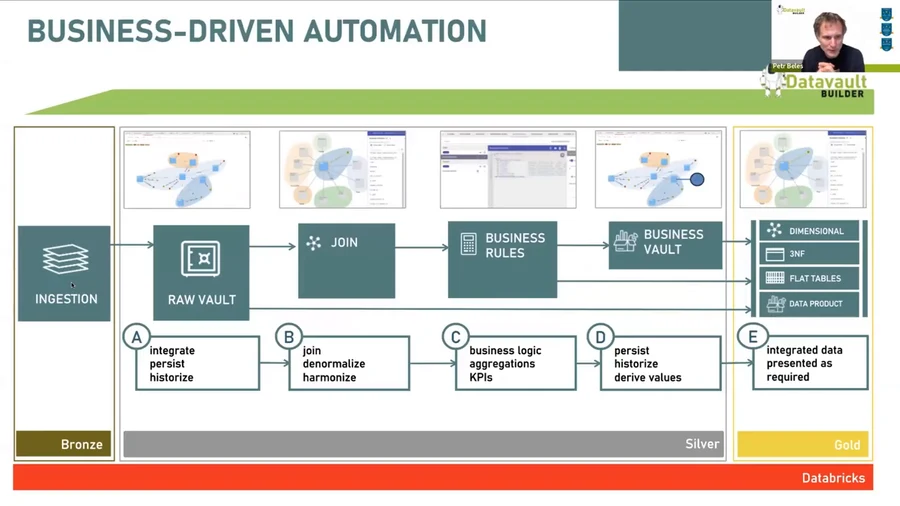
The Medallion Architecture in three layers
Databricks organises data flow through three clear responsibilities:
- Bronze — Raw, unchanged, historised data from source systems. The landing zone. Fast ingestion, full auditability.
- Silver — Cleansed, validated, integrated data. The central business model. Stable against source system changes. Full history maintained.
- Gold — Consumption-ready, optimised for BI, AI/ML and data products. Business users work here.
The key insight from the webinar: Silver is the natural home of Data Vault. The Raw Vault maps directly to the Silver layer. Business Vault sits just above it. And the Gold layer — dimensional models, star schemas, flat tables — can be auto-generated by Datavault Builder from the same underlying model.
Why Data Vault belongs in the Medallion stack
Three pillars make Data Vault the right modelling approach for a modern Lakehouse:
1. Uniform understanding of data Data Vault puts the business model at the heart of the platform — not as a one-time artefact but as a living structure. Every hub, link and satellite is documented automatically, and data lineage runs from source table to report column without manual effort.
2. Modular business rules Business requirements change. Data Vault is designed for it. Each business rule lives in isolation — you can add, change or retire rules without breaking the rest of the model. Flat tables and 3NF models break under change. Data Vault does not.
3. Scalability across loading modes Databricks brings powerful tools for both batch and streaming ingestion (Autoloader, Spark Streaming, Delta Live Tables). Data Vault’s bi-temporal patterns — tracking both when data arrived and when it was true in the source — handle both loading modes in the same model. Hubs and Satellites accommodate streaming out-of-order delivery and deduplication naturally.
Full functional parity on Databricks
Datavault Builder on Databricks now delivers the same functional coverage as on Snowflake, BigQuery, SQL Server, and all other supported platforms. The live demo in the webinar walks through the full workflow:
- Conceptual modelling — define business entities visually; Databricks tables are created in real time
- Staging / ingestion — connect to any source; ETL/ELT code generated and executed automatically
- Raw Vault loading — Hubs, Links, Satellites loaded with full historisation and delta handling
- Output delivery — dimensional models and flat tables generated from the same model for BI tools (Power BI, Tableau, Qlik)
- Lineage and deployment — automatic documentation, Git versioning, deployment and rollback scripts; REST API for CI/CD pipelines
A typical enterprise project uses 7–9 separate tools to cover this process. With Databricks and Datavault Builder, it’s two.
The practical reality check
The webinar closes with an honest assessment of where this combination works best:
- Batch-first or streaming-first projects: both patterns work. For 99% of use cases, micro-batch at 1-minute intervals is sufficient — no need for pure real-time processing.
- Existing Databricks environments: Datavault Builder connects directly to existing Unity Catalog databases. No migration required.
- AI and ML pipelines: Gold layer data products are already structured for feature stores and ML models. The same foundation serves BI and AI workloads.
The message from Simon Dudanski, who spent a decade advising against building Data Vault on big data platforms, is now unambiguous: “My world is complete. I have everything in place I need.”
Want to see how Datavault Builder fits your Databricks environment? Book a free 20-minute demo — we’ll walk through your specific use case.